
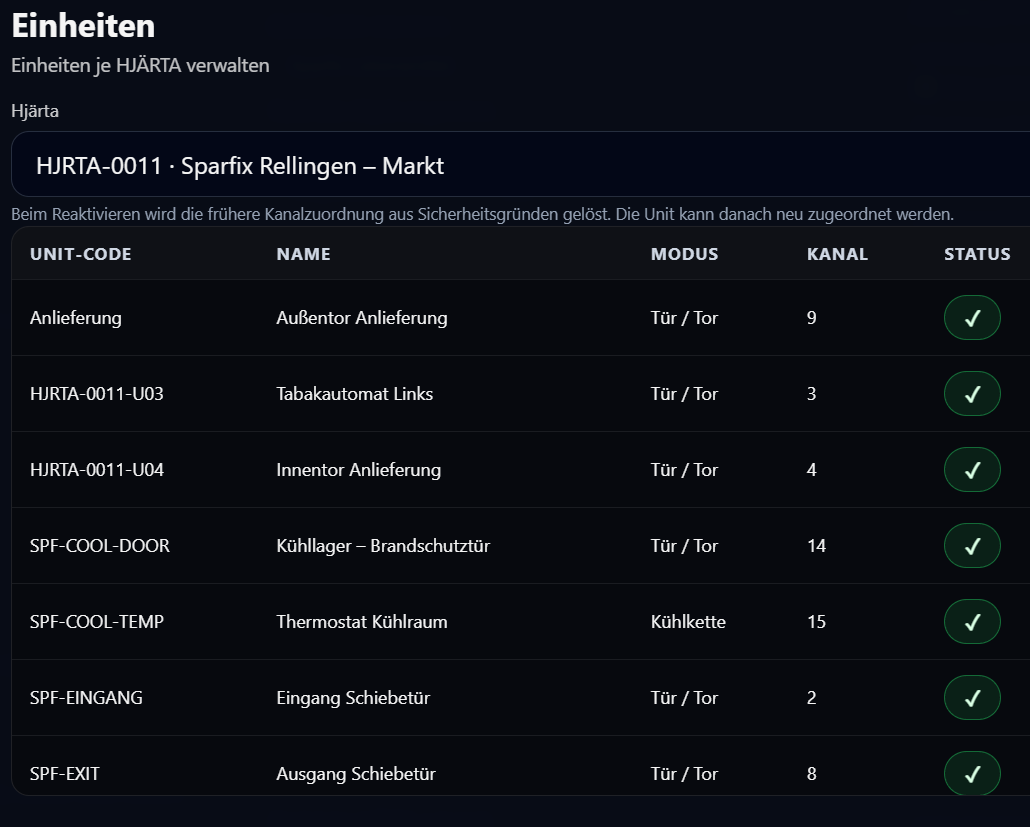
VAKTEN can now do more than just display units. It can manage them directly. For this purpose, the HJÄRTA card in Settings now includes the new Units section.
What is new
- Units can now be deactivated per HJÄRTA.
- Deactivated units remain stored and can be reactivated later.
- Archived units no longer appear in the regular report.
- When reactivating a unit, the previous channel assignment is cleared for safety reasons.
How to use it
- Open Settings.
- In the HJÄRTA card, click Units.
- Select the desired HJÄRTA at the top.
- The table shows active units first and inactive ones below.
- Use the status icon on the right to deactivate or reactivate a unit.
Important note on reactivation
After reactivation, the unit must be assigned to a channel again. This is done in the detail view via the Primary sensor section.
Why this matters
This keeps the structure clean: units that are no longer needed disappear from the active view without losing their data. At the same time, conflicts with old channel assignments are avoided.
In short: less clutter in the report, more order in real-world use.